

Zoom
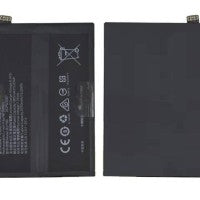
The Oppo Reno 4 5G (Model PDPM00 / CPH2091) replacement battery is built on a high-voltage dual-cell architecture connected in series. By joining two distinct internal lithium-polymer pouches within a single frame, the system splits the immense incoming current of its 65W charger.
Installing a cheap, standard single-cell aftermarket alternative will permanently disable your flash-charging capability and frequently triggers processor logic instability or continuous boot-loops.
When sourcing a factory-original service pack or premium OEM-grade replacement assembly, confirm that the parameters printed on the cell casing perfectly match these specifications:
⚠️ Critical Variant Warning: Do not mistake this for the Oppo Reno 4 4G (CPH2113) battery or the Reno 4 Z 5G battery (Model BLP779). The 4G and Z versions use single-cell 3.8V modules which are completely incompatible with the high-voltage dual-cell layout required by your 5G device.
Because the Reno 4 5G transfers considerable current during fast-charging cycles, low-quality clones pose an immediate performance bottleneck and safety hazard. Look for these essential quality markers:
The Rolling SUPERVOOC 2.0 Animation: Authentic Oppo BLP789 modules feature a proprietary cryptographic microchip on their protection board. When attached to an official 65W charging brick, the lock screen triggers the SUPERVOOC 2.0 animation featuring a moving decimal point counter. Fakes drop back down to generic "Fast Charging" or standard slow charging speed.
The Voltage Signature: Standard standalone smartphone cells read ~3.8V nominal. Because the BLP789 links two cells in a series chain, its true nominal voltage reads 7.74 V. If a vendor offers a battery for your model stamped 3.8V or 3.85V, it is a low-grade counterfeit that will fail to power the motherboard.
Active Temperature Sensor (NTC) Tracking: Genuine service packs utilize a pair of active thermistors to update your system regarding internal core thermal changes. Counterfeits often substitute a cheap static resistor that permanently reports a fake "safe" temperature. If your phone locks up or displays a "Battery Temperature Error", the hardware is a knockoff.
1. Safety Pre-discharge Check: Use your phone until the charge drops below 25% before starting the repair. Puncturing or squeezing a high-voltage dual-cell lithium pouch at full charge can trigger a violent chemical fire or aggressive sparking.
2. Removing the Glass Back Cover: The Reno 4 5G relies on a tightly bonded glass rear panel. Apply uniform heat around the perimeter using a hairdryer or heating pad for roughly 3 minutes to soften the factory adhesive. Use thin plastic opening tools or playing cards alongside a drop of isopropyl alcohol to separate the seam—do not use rigid metal pry bars, as they easily crack the back glass.
3. Ribbon Cable Interference: Once inside and the motherboard shield armor is unbolted, unplug the battery flex ribbon terminal immediately before handling any other component lines. Take extra care because the primary display flex cable and the sub-board interconnect ribbon run straight across the top face of the battery pouch profile.
4. Mandatory Software Fuel-Gauge Calibration: Force the Android operating system to accurately map the new twin-cell power framework via this conditioning routine:
Fully reassemble the phone, power it on, and hook it up to your authentic 65W SUPERVOOC adapter. Let it charge continuously until it hits 100% (leave it on the line for an extra 30 minutes).
Use the phone completely normally throughout your day until it drains down to 0% and shuts off on its own.
Charge it right back up to 100% without interruptions to align the battery logic counter chip.
Wishlist is empty.

