

Zoom
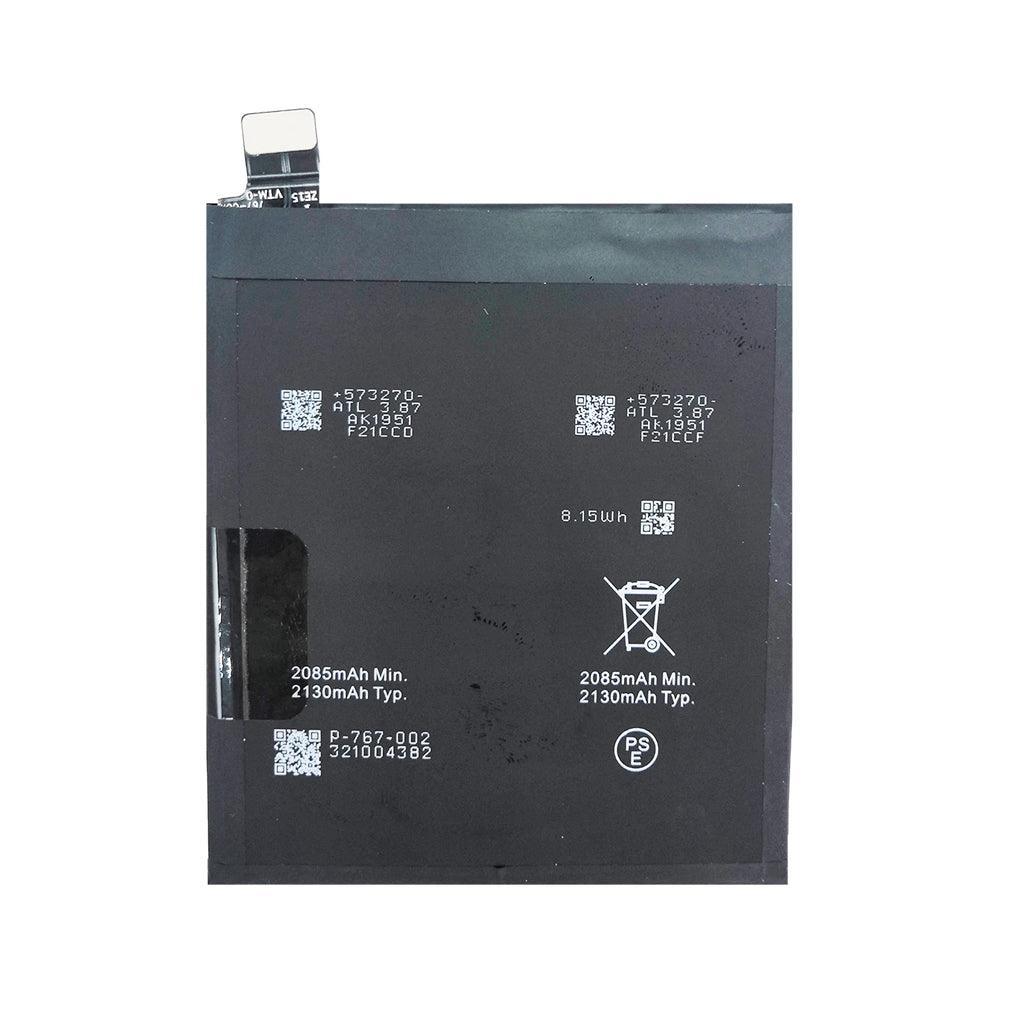
The Oppo Find X2 Pro (Model CPH2025) replacement battery is distinct because it relies on a dual-cell configuration connected in series. This layout allows the phone to pull a massive 65W of power during fast charging by splitting the voltage across two internal cells simultaneously. Using a standard single-cell aftermarket copy will completely break fast charging and can cause software boot-loops.
When sourcing a factory-original service pack or premium OEM-grade replacement, verify the physical battery contains two distinct internal pouches and matches these parameters:
| Feature | Factory Hardware Specification |
| Compatible Model | Oppo Find X2 Pro (Strictly Model CPH2025) |
| Battery Model Number | BLP767 (Must match exactly) |
| Cell Configuration | Dual-cell series design ($2 \times 2130\text{ mAh}$) |
| Typical Capacity | 4260 mAh ($16.48\text{ Wh}$) |
| Rated Capacity | 4170 mAh ($16.13\text{ Wh}$) |
| Nominal Voltage | 7.74 V (Dual-cell total output) |
| Limited Charging Voltage | 8.85 V |
| Fast Charge Protocol | 65W SUPERVOOC™ 2.0 Flash Charge |
Because the Find X2 Pro uses a high-voltage 7.74V dual-cell system, low-tier counterfeits are highly unstable and dangerous. Look for these crucial indicators:
The 65W SUPERVOOC 2.0 Interface: Authentic Oppo BLP767 batteries contain an encrypted communication IC chip on the safety protection board. When plugged into a genuine 65W adapter, the screen will trigger the SUPERVOOC 2.0 animation with a moving decimal point. Counterfeits will show basic "Fast Charge" or generic charging.
The Voltage Check: Standard phone batteries output ~3.8V nominal. Because the BLP767 connects two cells in series, its nominal voltage reads 7.74 V. If a seller offers a battery for this phone labeled 3.8V or 3.85V, it is a low-quality single-cell knockoff that will not function correctly.
Temperature Sensor (NTC) Tracking: A true service-pack replacement maintains active thermistors for both internal pouches. If you install a fake that uses a static bypass resistor, your device may get stuck permanently showing a single battery percentage (like 50%) or throw a "Battery Temperature Error" error upon booting.
1. Safety Pre-discharge Check:
Use your phone until the charge drops below 25% before opening it. Puncturing a dual-cell high-voltage lithium battery carrying a full charge poses double the risk of a dramatic fire or chemical explosion compared to regular phones.
2. Removing the Back Panel (Ceramic, Glass, or Leather):
Depending on your specific Find X2 Pro variant, your back plate is made of fragile ceramic, glass, or vegan leather. Apply consistent heat around the edges for 3 minutes to soften the strong waterproof adhesive seal. Slice through it carefully with thin plastic opening tools—avoid metal pry tools, as they will chip ceramic or tear leather.
3. Ribbon Cable Hazards:
Once inside and the shield plates are unbolted, unplug the battery flex terminal immediately before disconnecting any other component. Note that the main display flex cable and the sub-board interconnect cable run straight across the top of the battery pack. They must be handled gently so they aren't torn during extraction.
4. Software Fuel-Gauge Calibration:
Force the Android operating system to map the new twin-cell capacities correctly by completing this routine:
Reassemble the device, turn it on, and plug it into a 65W SUPERVOOC brick. Let it charge uninterrupted until it hits 100%, then leave it plugged in for an additional 30 minutes.
Discharge the phone naturally through normal daily use until it reaches 0% and powers off completely on its own.
Charge it right back up to 100% without unplugging it midway. This resets the charging logic counter chip.
Wishlist is empty.

